

This is a review of the online course User Experience: The Ultimate Guide To Usability, by David Travis. The author was provided with a review copy of the course.
This is the second in our series of reviews of online UX courses. Read some of our other reviews or browse the full list of online UX courses.
Course Information
- Course Name: User Experience: The Ultimate Guide to Usability
- Author: Dr David Travis
- Hosted by: udemy
- Length: 53 lectures + bonus material (approx 7.5 hours of video content)
- Intended Audience: web designers, newcomers to the field of usability, intermediate UX designers
- What You’ll Learn: A comprehensive “soup-to-nuts” introduction to user-centred design, and the techniques for achieving good usability in the design of software, including contextual inquiry, user testing, paper prototyping, card sorting, personas, scenarios and more.
- What You Won’t Learn: Techniques not directly related to usability aren’t covered, like how to perform competitor analysis or collaborative sketching.
- Assumed Knowledge: Basic familiarity with web design projects would be an advantage.
- Price at time of review: US $199
(Save 20% by subscribing to the UX Mastery newsletter)
Review
A few weeks ago we reviewed Amir Khella’s online course, Design Your User Experience In 7 Simple Steps. Khella’s approach to UX was well suited to folks working on a startup—perhaps for themselves—and who had a technical background. However, it was lacking in the people side of things, and didn’t cover any of the tried-and-tested UX techniques like those listed in our UX Techniques Bank.
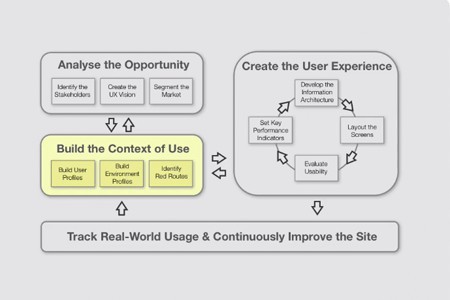
This course takes a different approach: it’s a comprehensive walkthrough of the field of usability. Dr David Travis is both an experienced practitioner and a gifted educator, and this course really does live up to its “ultimate guide” title. Dr Travis covers a ton of UX techniques in depth, and explains them in a friendly, humorous fashion. We’ve talked about possibly creating our own courses here on UX Mastery—well, if we were to ever tackle such a thing, the bar just got set very high.
The Presenter
Dr. David Travis is the Managing Director of Userfocus, an independent consultancy in the UK that specialises in user experience. He has worked in the fields of human factors, usability and user experience since 1989—that’s nearly 25 years of experience. David also holds a BSc and a PhD in Psychology, and he is a Chartered Psychologist. He’s written scientific papers and published a few books on the topic. This is a guy who knows what he’s doing.
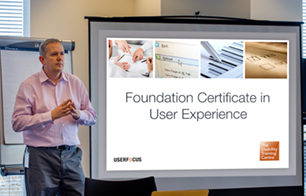
And it shows through in the video lectures. Rather than lose touch with beginners in the field, as so often happens with ‘experts’, Dr Travis has also been teaching in-person workshops on user experience for years, and it’s the content from these workshops that informs this online course. His tone is friendly but authoritative; there is humour peppered throughout the course, and the examples are often entertaining but always educational.
Target Audience
This course is primarily targeted at newcomers to user experience. There’s no real assumed knowledge, so it would be suitable for visual designers, project managers, content producers, product managers or marketers—anyone with an interest in usability. Because it’s so comprehensive (the term “soup to nuts” comes to mind), I imagine this course could also be useful for more experienced practitioners who are looking for a refresher, or want to validate some aspect of how they go about implementing a certain technique.
Stream or Download
I mentioned in my last review that I am a fan of the udemy in-browser experience. The option to download videos is handy, although there’s no easy way to download all of them in one hit—possibly to discourage piracy? This time round, I installed the udemy app, and watched some of the video lectures on my iPad, which worked great!
Why I Hate This Course
There’s one big reason why I hate this course—and that’s because I wish I’d created it myself! This really is online education at its best: the content is comprehensive, well-structured, and up-to-date, and it’s delivered by an instructor who is likeable, funny, and uses interesting examples. There are case studies and pop quizzes along the way to help you validate your learning, and the video and audio quality is high. Really, you can’t go wrong. If you’re after an online course that teaches you how to do user-centred design, and equips you with the tools and templates to go change the world (or at least your own organisation) then this is the course for you.
Pros
- Well structured, well-paced content from a knowledgable presenter.
- Comprehensive walk-through of the user-centred design process, including coverage of all of the major usability tools and techniques
- Real-world cases studies and occasional humour keeps things interesting
- Pop quizzes through-out help to validate your understanding of the content
- Comes with downloadable templates and worksheets you can apply on your own projects
- “Refresher course” is available by email after completing the course
- Includes a range of material to suit a range of learning styles, including video, short books, and even comics.
Cons
- Some people may find the content a little slow at times. Personally, I liked the “gently, gently” pace, and the anecdotal stories helped to reinforce the content for me.
- There’s no play-along-at-home example woven throughout this course. That said, there are a handful of standalone activities and pop quizzes, so you still have ample opportunity to test and apply your knowledge.
- 7.5 hours is a fair investment of your time. While for many this will be a positive thing (value for money!), others may find the sheer volume of information overwhelming. However, there’s no fluff here—if you want to get a solid handle on this stuff, you’ve got no choice but to knuckle down and work through the entire course. If you’re interested in the topic, the time will fly past!
Summary
Overall, User Experience: The Ultimate Guide to Usability is a cracking course. Dr Travis has pulled together a range of content that he’s refined during his years of consulting and teaching in-person workshops, and the result is a mammoth goldmine of useful online UX training. Whether you’re after a solid introduction to user-centred design, or you’re already working as a UX designer and looking for a refresher, you’re likely to find it in this course. The content is comprehensive, up-to-date, and polished. This course really is quite a remarkable achievement, and comes highly recommended.
- Content (how useful, up to date, practical, and comprehensive): 10/10
- Delivery (presentation style, pace, clarity, authority): 10/10
- Production (video quality, audio quality, editing): 9/10
- User Interface (reliable infrastructure, usable interface, convenient): 9/10
- Overall rating: 10/10
Course Contents
- Introduction
- Going where the action is: Understanding users in context
- How to get niche quick
- What can a London bus teach us about usability?
- Beyond “easy to use”: Measuring the user experience
- Site structure and navigation: Finding is the new doing
- Simple rules for designing simple pages
- “And I have the data to prove it”: How to assess a web site
- What next? Putting your knowledge into practice
The User Experience: The Ultimate Guide to Usability course is hosted at udemy.




Great review Matt! Was thinking about purchasing ‘Design Your User Experience In 7 Simple Steps’ but from this 10/10 review i think this one is the one to go for. Hopefully a UX Mastery course is in the cards, it would be awesome!
David really has done a great job of the course. I did hesitate about giving 10/10, as everything can be improved in theory. But in this case I think it’s deserving.
If we ever create our own course, we now have a yardstick to measure ourselves against!
I recently used this course and it is helping myself and my organization out a tremendous amount. Srsly. Get.this.course.
Great to hear, Tyler! Yeah it’s pretty darn good, isn’t it? Thanks for chiming in.
Thanks for this review, I initially went to the udemy page and because they force you to signup before you even read the outline I just ditched the idea. I’m glad I had the chance to actually find out about the course without being forced to signup with udemy.
Maybe they need a few UX lessons of their own? LOL
My pleasure Nur Ahmad. I hope that, if you take the course, it helps you in your career!
Cheers
Matt
This is an excellent course! I used the promo code and took it :)
For a UX self-starter like me, this course provides a very well organized structure for UX and step-by-step guide for key UX deliverables. I strongly recommend this course.
Also, David is very open to advice and LinkedIn invites :D
Great to hear you enjoyed it, Yingying!
HI Matt,
Is there any specific course for mobile UX designing ?
I am a newcomer to the field of usability.
Pankaj
Hi Pankaj. Given you’re a newcomer, I’d strongly recommend this course over something specific to mobile. The principles apply whether you’re designing a website, mobile app, desktop app, or something else.
All the best
Matt
After having read your review, I decided to take the course. I finished it one week ago and I loved it !
It’s definitively worth your money: the general process is clear, David gives many practical example and tips, and he has a great sense of humor ! (Which is important if you don’t want to regularly fall asleep in front of your computer).
It actually made me decide to start a personal blog about everything I will now explore and learn with UX and my first article has been a review of David’s course. You can have a look here : http://isuckatux.wordpress.com/2013/08/22/where-i-truly-learnt-ux/ .
Thanks again for this great discovery, guys !
(By the way, I love all of your articles, so far. The advices are clear and really helpful for young people interested in UX like me ;-). Keep up the good work !)
Good on you, Mathieu! And thanks for the kind words!
I’m a graphic designer (mainly print, POP, and packaging) and so some minimal web design. I’m noticing a higher demand for UI/UX knowledge. Would this course be too advanced for a noob like me to learn?
Also would I be able to download the lessons (even one at a time, i know it mentioned it cant download them all at once).
Thanks!
Hi Christian.
No I don’t think it will be too advanced for you. David starts at the basics and works up from there.
Also, if you’re not yet subscribed to the UX Mastery newsletter, doing so will unlock a discount code for 20% off.
Cheers!
Matt
I’m a Web developer (HTML, Css, Javascript and ASP.NET) but I’m interested in U/X topics as I’m starting to enter the field to complement my knowledge as a developer. Can I take this course without the fear of not understanding some concepts?
Thanks in advance.
Hi Raul.
If you’re just starting out, I’d say it’s a great starting point. You can get 75% off with this link.
Enjoy
Matt
Thanks for the review. However as a Deaf person, I do have a question – are the audio content accessible such as captions or subtitling? Otherwise it’d be pointless for folks such as myself to shell out $200 for this.
Hi Michael. Not sure if udemy supports captioning, but every lesson has been fully transcribed, which is something.
Have crossed the bridge over brochures flyers and am adept at that, but am always tested on web, UI, UX. Wondering what is the devil in the details I am missing.
Hi .. any chance you think this course will get discounted again with a coupon code? I’d love to take it!
Hi Ana. We offered a discount code to our email newsletter subscribers recently. Just sent you an email with details.
Hi Matthew, Could I bother you for the discount code as well. Really want to take this course! I have signed up for the newsletter. Thank you!
Sent you an email, Peta.
Hi Matthew,
Could I have the discount code as well?
Thanks!
Email sent. :)
Can I Have the coupon too? thanks!
I would love to get a discount code as well? :)
Since my previous comment I have signed up with Udemy, what an awesome initiative. Still haven’t taken the UED course, still just outside of my current budget but I can clearly see from the content, feedback and the UserFocus site that it’s essential for a beginner.
Please keep us updated on any other learning resources on a similar level. I’m a designer with 15 years experience only now making a clear dive into Official UX practices and wanting to earn the label of UX Designer
Hi Matt,
I would love to take this course, is there any more coupon available by any chance?
Thank you,
Frank
Hi Frank, sorry no more coupons left!
Hi Matt,
Thanks for the review. Very helpful. I’ve signed up for your newsletter and look forward to learning!
You’re very welcome jj. =)